
Need it fixed today in Houston?
Licensed & insured technicians • Most repairs done same day • 90-day warranty on replaced parts
Your GE refrigerator is beeping, flashing an error code, or suddenly not keeping your food cold. Before you worry about an expensive repair, take a moment that code is your refrigerator’s way of telling you something needs attention.
In this guide, you will learn what common GE refrigerator error codes mean, what may be causing the problem, and which simple steps you can try at home. We’ll also explain when a code points to a problem that needs a professional repair. When your freezer is getting warm, your ice maker has stopped working, or a code keeps coming back, you’ll know what to check and what to do next.
GE Refrigerator Error Codes List and Meanings
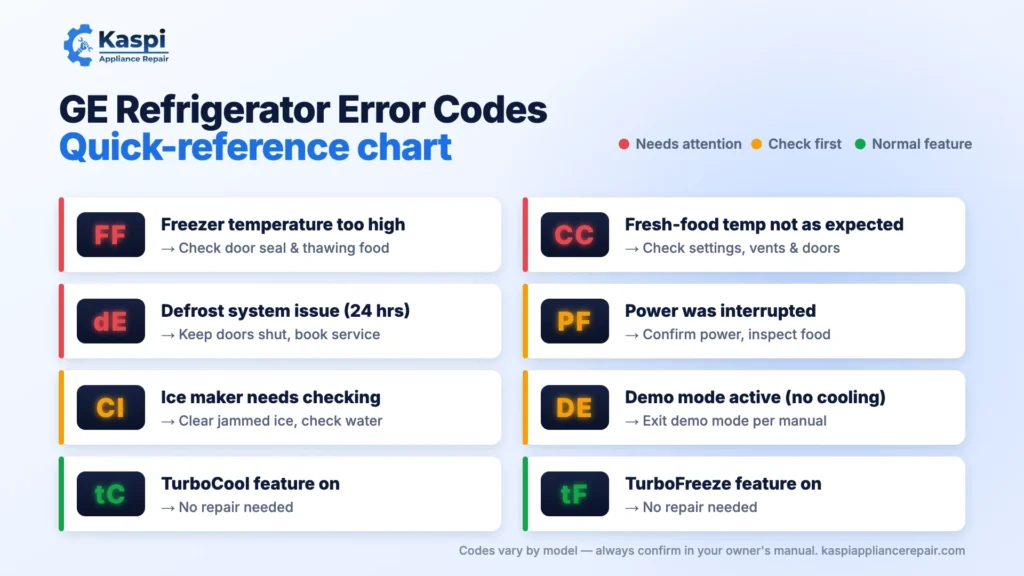
GE refrigerators use display codes to flag certain problems or show when a special feature is active. Check your code in the table below to understand what it means and what to check first. Code meanings can vary by model, so confirm the details in your refrigerator’s owner’s manual.
| Error code | What it means | First step to take |
| FF | Freezer temperature is too high. | Check whether frozen food is thawing and make sure the freezer door closes fully. |
| PF | Power to the refrigerator was interrupted. | Check that power has been restored and inspect food for signs of thawing or warming. |
| CI | Ice maker needs to be checked. | Look for ice clumps blocking the ice maker or bin. |
| CC | Refrigerator temperature is not at the expected level. | Check the temperature settings and make sure the doors are fully closed. |
| dE | Defrost system has not worked properly within the past 24 hours. | Keep the doors closed as much as possible to help retain cold air and arrange service if needed. |
| DE | Demo mode is active on models using this code. | Check the owner’s manual for the correct way to exit demo mode for your model. |
| tC | TurboCool feature is active. | No repair is needed if you intentionally turned on TurboCool. |
| tF | TurboFreeze feature is active. | No repair is needed if you intentionally turned on TurboFreeze. |
These definitions follow GE Appliances’ published guidance for these codes; not every GE refrigerator displays all of them. Own a different brand? Compare these with our Samsung refrigerator error codes guide.
Important: If the code remains after the recommended checks, or your refrigerator is not keeping food cold, use the troubleshooting instructions for your exact model or arrange professional diagnosis. Don’t assume that clearing a display code has fixed the underlying problem.
Common GE Refrigerator Error Codes and How to Fix Them
When a GE refrigerator shows an error code, the right fix depends on what the code means and which model you own. Start with the code on your display, try the safe checks below, and use your owner’s manual to confirm model-specific instructions.
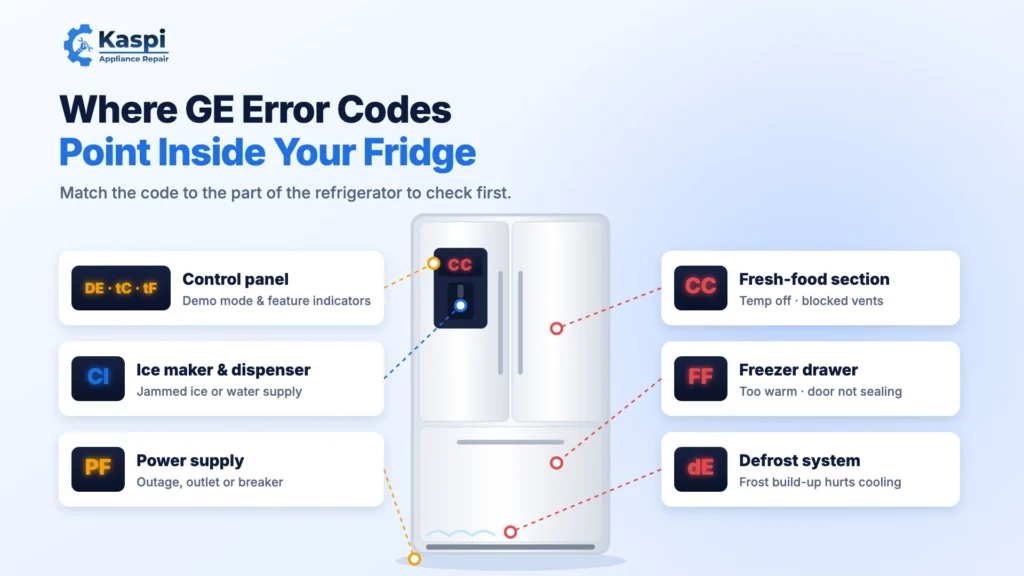
FF, PF, CI, CC, dE and DE Error Codes
FF — Freezer temperature is too high. Check whether frozen food has started to thaw. Make sure the freezer door closes fully and no food package blocks it. Keep the door closed as much as possible while the freezer cools. If the temperature does not return to normal, the refrigerator may need professional diagnosis.
PF — Power interruption. This code means power to your GE refrigerator was interrupted. If your home recently lost power, check that electricity has returned and the refrigerator is running normally. If the code keeps appearing without a known outage, have the power supply checked.
CI — Ice maker problem. Check whether ice cubes are jammed in the ice maker or storage bin. Make sure the ice maker is switched on and its water supply is connected, if your model uses one. If it still does not make ice or the code returns, the ice maker may need further testing.
CC — Temperature control warning. Check your refrigerator’s temperature settings and make sure both doors close properly. Avoid blocking the vents inside the refrigerator. If the temperature remains incorrect or the code returns, a temperature-control or cooling problem may need diagnosis.
dE — Defrost system problem. GE uses this code when the defrost system has not operated properly within the past 24 hours. Keep the doors closed to retain cold air and arrange professional service if the code remains. A faulty defrost system can allow frost to build up and affect cooling.
DE — Demo mode. On GE models that use this code, demo mode allows the lights and controls to work while the cooling system is disabled. Check your owner’s manual for the correct way to exit demo mode. GE recommends trying a power disconnect for one or two minutes; if the code remains, contact support with your model number.
GE Refrigerator tC and tF Display Codes
If your GE refrigerator displays tC or tF, don’t assume something is broken. These are normal feature indicators on compatible models.
tC — TurboCool: This feature temporarily increases cooling in the refrigerator compartment. If you turned it on, no repair is needed just because the indicator appears.
tF — TurboFreeze: This feature temporarily boosts cooling in the freezer compartment. It is also a normal indicator, not an error code.
How to Reset a GE Refrigerator Error Code
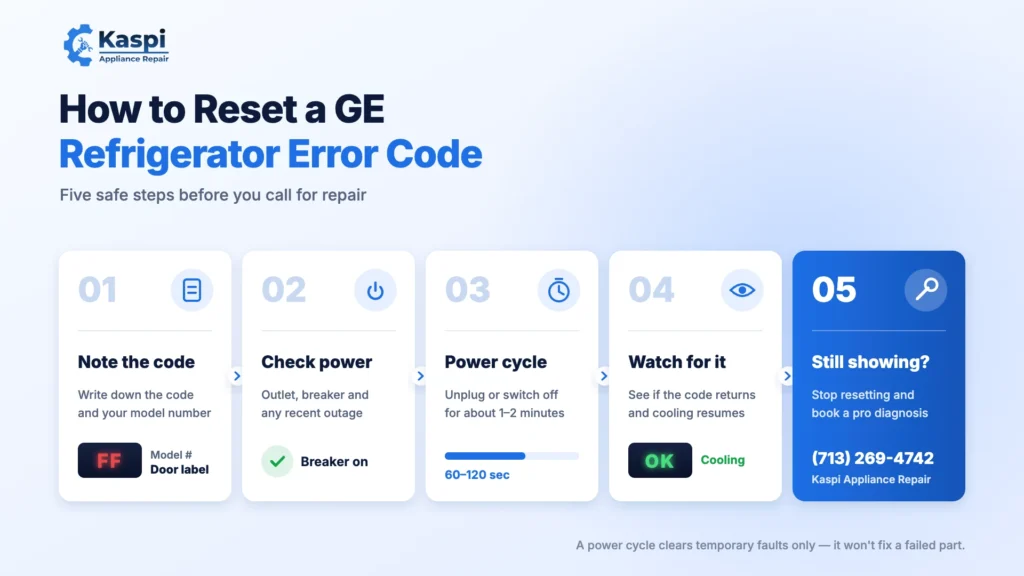
To reset a GE refrigerator error code, first identify what the code means. Some codes clear after a power interruption is resolved, while others indicate a problem that a reset will not fix. Follow these steps before trying to restart your refrigerator.
1. Check the Error Code and Refrigerator Model
Write down the exact code shown on the display, including uppercase and lowercase letters. Find your refrigerator’s model number on the label inside the fresh-food compartment or in your owner’s manual. Check the model-specific instructions before resetting the appliance.
2. Check the Power Supply
If your GE refrigerator displays a PF code after a power outage, make sure the electricity has returned and the refrigerator is running normally. Check the household breaker if the outlet has lost power. If the breaker trips repeatedly, stop resetting it and contact a qualified electrician.
3. Power Cycle Your GE Refrigerator
If your owner’s manual allows it, a power cycle may clear a temporary display issue.
- Turn off the refrigerator using its controls, if available.
- Unplug it from the wall outlet, or switch off its dedicated circuit breaker if the outlet is inaccessible.
- Wait about 1–2 minutes, unless your model’s instructions specify otherwise.
- Restore power and allow the refrigerator to restart.
- Check whether the code has cleared and whether the appliance is cooling normally.
Important: A power cycle does not repair a failed component. Avoid moving a heavy refrigerator or reaching behind it if doing so is unsafe.
4. Check Whether the Error Code Returns
After restarting, monitor the refrigerator’s temperature and display. Some codes clear when the underlying condition is resolved; others return if the fault remains.
- FF: Check that the freezer door seals properly and that cooling resumes.
- CI: Check for jammed ice cubes and confirm the ice maker’s water supply, where applicable.
- dE: A persistent code may indicate a defrost-system problem that needs diagnosis.
- CC: If the refrigerator remains too warm, check the settings and airflow before arranging service.
These are initial checks, not guaranteed fixes. Follow the troubleshooting instructions for your specific model.
5. What If Your GE Refrigerator Error Code Won’t Clear?
If the code returns after a reset, don’t keep power cycling the refrigerator. Record the code, model number, and any symptoms, such as a warm freezer, leaking water, or an ice maker that has stopped working. Use GE’s official model-specific troubleshooting guidance or arrange professional refrigerator repair.
Schedule GE Refrigerator Repair with Kaspi Appliance Repair in Houston, TX
When your GE refrigerator displays an error code like FF, CC, or PF and the problem doesn’t go away, you need a repair team that can identify the cause and explain your options. Kaspi Appliance Repair has served Houston homeowners since 2017, helping diagnose refrigerator cooling problems, ice maker failures, and other appliance issues.
Here’s what you can expect when you schedule service:
- Local experience: Serving Houston since 2017, with experience troubleshooting refrigerator problems.
- Customer feedback: 260+ five-star customer reviews and a three-time Best Pick Reports recognition.
- Clear diagnostic pricing: The diagnostic fee is $75 and is waived in full when you proceed with the repair.
- Repair warranty: A 30-day labor warranty and a 90-day parts warranty.
If your GE refrigerator is not cooling, the freezer is warming up, or an error code keeps returning after a reset, a professional diagnosis can help determine whether the issue involves the defrost system, temperature controls, or another component.
Kaspi Appliance Repair
1506 Robin St, Houston, TX 77019
Phone: (713) 269-4742
Call to schedule GE refrigerator repair in Houston, TX, and discuss the symptoms and error code your appliance is showing. Outside the city? We also provide GE refrigerator repair in Cypress, TX.
Frequently Asked Questions About GE Refrigerator Error Codes
-
1. What are the most common GE refrigerator error codes?
Common GE refrigerator error codes include FF, PF, CI, CC, dE, and DE. FF indicates a freezer temperature that is too high, while PF reports a power interruption. CI tells you to check the ice maker, and dE indicates a defrost-system problem. DE means demo mode on models using this code. Always confirm the meaning for your model.
-
2. How do I reset a GE refrigerator error code?
To reset a GE refrigerator error code, first check what the code means and follow your model’s instructions. For some models, disconnecting power for one or two minutes may reset the control panel. Restore power and check the display again. If the code returns, the underlying problem may still need attention. Never assume a reset has repaired the fault.
-
3. What does FF mean on a GE refrigerator?
The FF error code on a GE refrigerator means the freezer temperature is rising too high. Check whether frozen food is thawing and make sure nothing is blocking the freezer door. Keep the door closed as much as possible while the temperature recovers. If the freezer stays warm or the code returns, the refrigerator may need professional diagnosis.
-
4. What does PF mean on a GE refrigerator?
PF on a GE refrigerator means power to the appliance was interrupted. This often happens after a power outage or brief electrical interruption. Check that the refrigerator has power and is running normally, then inspect the food for signs of thawing or warming. If PF keeps appearing without a known outage, have the power supply checked.
-
5. What is the difference between DE and dE on a GE refrigerator?
The difference between DE and dE matters because the codes indicate different conditions on compatible GE models. DE means demo mode, which can disable cooling while the lights and controls remain active. Lowercase dE indicates that the defrost system has not operated properly within the previous 24 hours. Check your model’s manual before troubleshooting either code.
-
6. Why does my GE refrigerator error code keep coming back?
A GE refrigerator error code may return because the problem that triggered it has not been fixed. For example, a dE code can indicate a defrost-system issue, while FF can mean the freezer remains too warm. Check the doors, temperature settings, and other safe, relevant items. If the code returns, arrange a model-specific diagnosis instead of repeatedly resetting the appliance.
-
7. Are tC and tF error codes on a GE refrigerator?
No. On compatible GE refrigerators, tC indicates that the TurboCool feature is active, while tF indicates that TurboFreeze is active. These are normal function displays, not fault codes. If you did not activate either feature, check your owner’s manual for its operation. If the refrigerator is not cooling properly, troubleshoot the cooling problem separately.
-
8. What does HRS mean on a GE refrigerator display?
On certain GE refrigerators with a CustomCool drawer, HRS refers to hours associated with the Quick Thaw or Express Thaw feature. It does not automatically indicate a refrigerator fault. GE states that the indicator should disappear when the relevant thaw feature is turned off. If HRS remains on the display, check your model’s manual or contact GE support.
Tried these fixes and it’s still not working?
Don’t risk making it worse. A Kaspi technician can diagnose and repair your appliance at your home in Houston and nearby areas.
Licensed & insured • Most repairs done same day • 90-day warranty on replaced parts